Thursday, April 14, 2016

Texas Blue Bonnet Photography Revisited.... This time with Acro Yogis


   So, a couple of weeks ago I posted about my first experience attempting to shoot the famous Texas Blue Bonnets. This past weekend, I got an unplanned second attempt, and I am pretty happy with the results. It was a complete surprise shoot, so I didn't have the ladder than I mentioned would have been nice to have on my next shoot, all I had was my daily carry camera, which stays in my car just in case of days like this one. My everyday camera carry kit consists of my Fuji X-T1 with the 18-135mm lens, and the Fuji EF 42 Hotshoe flash. All the shots in this post were made using that gear combo. I also keep my Mefoto Backpacker  in the car just in case, but didn't use it for this shoot.


   Here's how it came about. A month or so ago, one of the local acro-yoga crew I have connected with here in San Antonio posted about a 5K inflatable obstacle course race that he wanted to get a team together to run. I did one several years ago with my wife (just girlfriend at the time) and some trapeze friends back in San Diego, and had a great time, so I signed up. 


   Race morning came, and as I pulled into the parking area, noticed the fields between the parking area and the race checkin/start were full of blue bonnets and some other colorful spring flowers. A few moments later I realized that I was about to spend the day with some really beautiful and photogenic people with some cool skills, so I told everyone that if we had any energy left after the race we should do an impromptu blue bonnet acro photo shoot. We did, so we did. Once I had the settings and fill flash dialed in, I even passed the camera off and got in a couple of the shots, which almost never happens. (I'm the base)


 Overall I am really happy with how these turned out. I still wish I would have had a ladder to shoot from a down angle. I know, with a bunch of acro-yogis we could have done a two high and had the top person shoot. I did think of that, but I am on the heavy side for a flier so didn't want to crush anyone, and also didn't want to burden anyone else with having to worry about the camera while they were standing on my shoulders. (although I did run a little bit of the race with someone on my shoulders, just for fun.)


    Since I couldn't go high, I decided to play with a few low angles, to get a lot of the flowers in the foreground, and try to take focus away from the race parking lot in the background, as well as the occasional other runners heading back to their cars. That was hard, because we built up a bit of an audience before we were done. 


  So, round two. How did it stack up to the lessons I learned from the first time? Well, having enthusiastic models all around was a definite help. The fill flash made a huge difference, even though it was a bright sunny day and the EF 42 didn't really have enough power to fully balance the sunlight, it did help a lot. I didn't get to test the high angle idea, but the low angles worked pretty well. Overall I am very happy with round two, and if I can pull shots like these off with just the usual gear I carry in my car, can't wait for a chance to really pull out all the stops for another try at it.

Monday, April 11, 2016

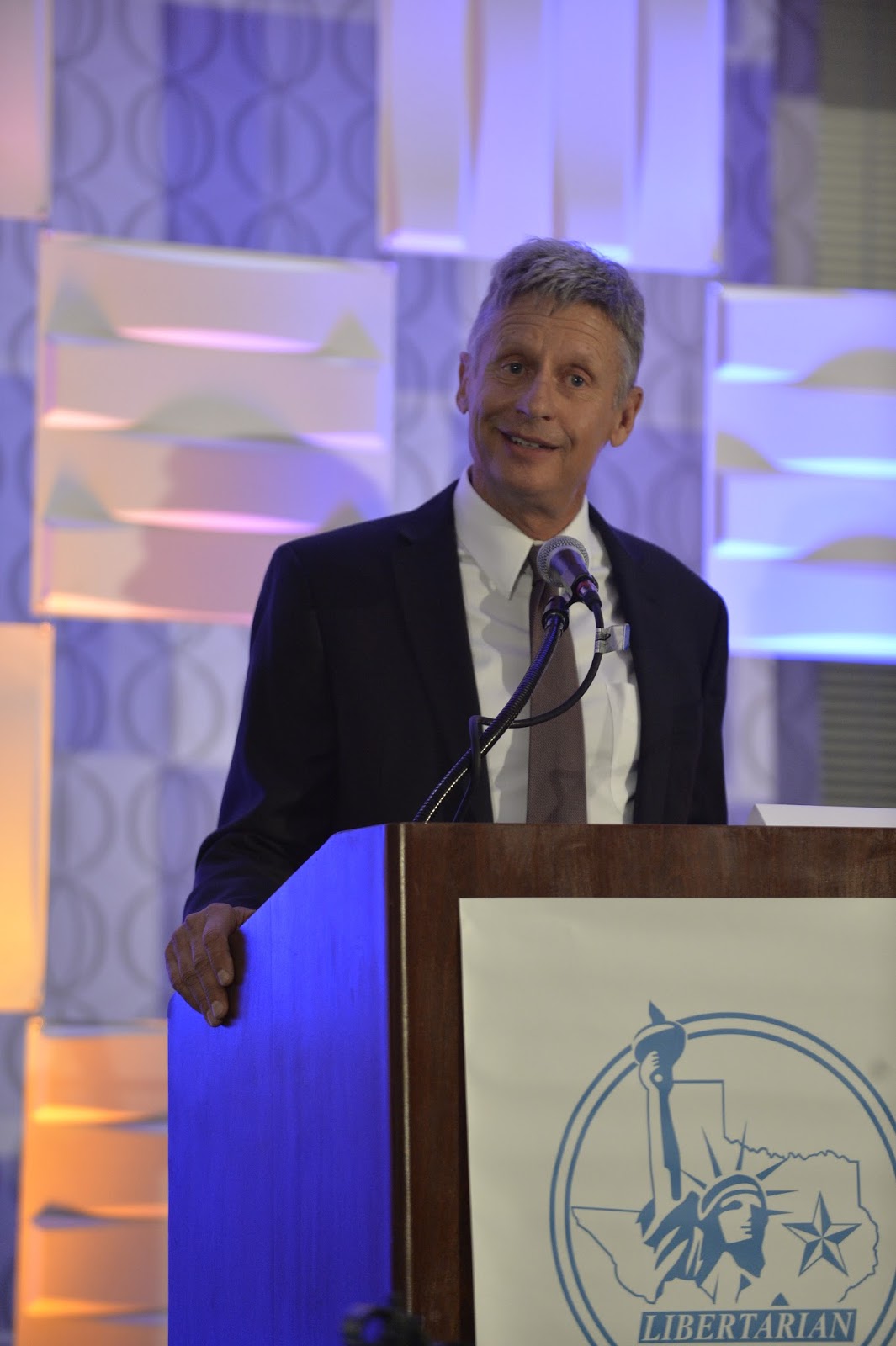
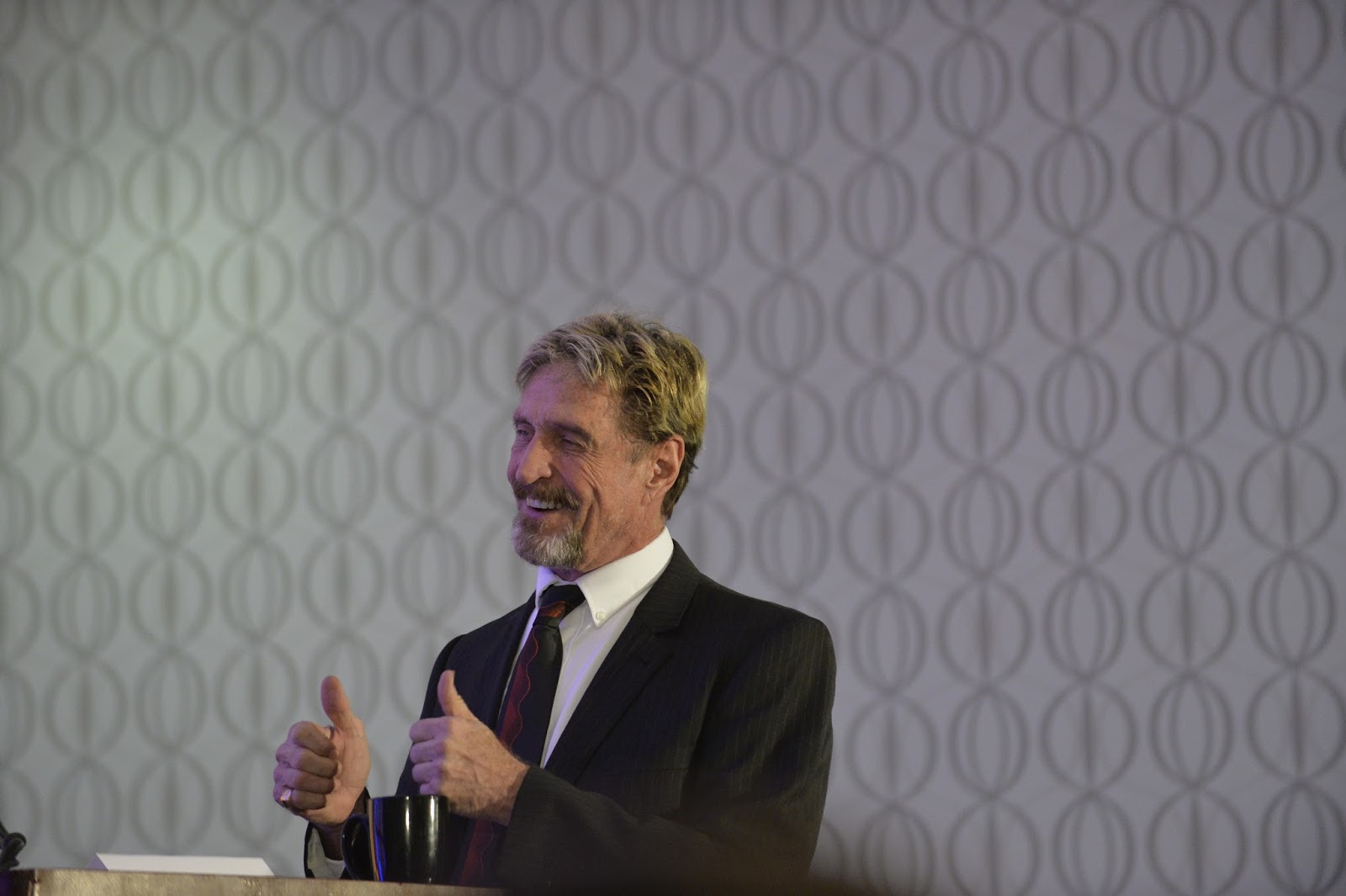
Shooting the Texas Libertarian Party Convention... couple semi famous faces in my portfolio now....


   So, answered an add in craigslist a few weeks ago, the Texas Libertarian Party was looking for photographers to cover their convention, which happened this past weekend here in San Antonio. I guess America actually has more than two parties... who knew? While spending a weekend listening to people discussing politics isn't really my idea of a good time, they offered a decent incentive package, including food and booze, so basically they had my number. I also figured it would be a good chance to get some practice at shooting more photojournalistic style stuff. As such, the images you see in this post are the straight out of camera JPEGs, which is something completely different from my usual work flow where only edited images ever see the light of day. All were imported, captioned, keyworded, culled and sorted via photomechanic and uploaded to the client (the party) as well as some news outlets in hopes of getting some shots picked up (more on this later) within an hour of the debate conclusion.

  I did a little research, and it looked like at least two people with fairly well known names would be at the convention and take part in the debate. The first, Gary Johnson, was a former Governor of New Mexico, former Ironman Triathlete and has summited Mount Everest. Pretty interesting guy.


  Then there was the big name, John McAfee.


   Yeah, That McAfee. You probably have had some of his anti-virus software on your system at one point or another. Often in the news for questionable life decisions, all of which he pretty handily addressed during his remarks. Also recently in the news for commentary on the Apple vs. FBI legal scenario.


  Anyway, I took the gig figuring it would be a good time and maybe I would be able to sell a few shots to some news outlets. That didn't seem to happen. If there is a secret out there to breaking into the photojournalism arena, I haven't found it yet. Most outlets don't even seem to have a readily accessible path to submit work. If they do, it's a "public eye" sort of thing for people to post their cell phone photos of traffic accidents and the like. Put a few feelers out there, didn't get anything back. Oh well, guess I'll put them on a few stock sites as editorial use and hope for the best.


  Anyway, the Libertarians were quite a mixed bag. The main thing that impressed me was that they all seemed to get along with each other, and the debate was entirely civil, even when they disagreed with each other on points. The party as a whole seemed to fold in a great number of other groups, some of which I support, some of which I am mixed on. I didn't realize they were so big on the open carry movement. Since getting established in Texas I have obtained my carry permit, and quite frequently carry a weapon, but I prefer to carry concealed. If I am ever in a situation where I need a weapon, I want it to be a surprise to the other involved party that I have it. I chose not to take my weapon with me to the convention because it would be a pita to add to all the camera gear I would be carrying anyway and I figured there would be ample security. As a result, I think I wound up being one of the few unarmed people in the room, which isn't a feeling I like too much, mostly because I know enough about history to not trust large groups of marginalized citizenry. Note to self- get a holster insert for my camera bag.....

  On the other hand, there were families,


  And even some LGBTQ representation....


 Overall it was an interesting time. I am not sure I was convinced to vote for any of the Libertarian candidates, but I am damn sure that if I had to pick a party to party with or hang out with for a beer or three, they would totally win. (to be fair, Obama and Trudeau are tops on on the list of politicians I'd have a beer with list and they aren't libertarians) But I was definitely impressed by the respectful tone of the debate and the diverse spectrum of people who come together under the libertarian banner. It was time well spent, and even though I haven sold any of the images yet, I'll give the experience two thumbs up.


  And in an ironic coincidence, I spent a lot of the rest of this weekend dealing with a DDOS attack against my router... maybe I should have asked McAfee for assistance?

Thursday, April 7, 2016

Storage solutions that do work....

  Ok, a couple of weeks ago I pointed out my somewhat disappointing experience with my WD MyCloud Drive, and promised to talk about some storage solutions that do work, so I figure it's finally time to deliver, so here are the functional solutions I use on a daily basis,

  For speed of workflow, I do all my editing on the 1 TB internal solid state drive I added to my macbook a while back. This is way faster than the old style internal disk drive I replaced. My personal images remain on the hard drive once they are edited and done, my professional work is moved off that drive to free up storage space once it's done.

  My primary hard drive is backed up two ways. First is a bomb proof on site drive. I like having a local backup for speed and easy access, but I wanted something survivable and very durable. After a bit of searching, I wound up going with an IO Safe Solo  3GB drive. Yeah, it's a bit bigger than my main drive, but that lets me keep multiple backups on it. The IO Safe drive is basically a hard drive built inside of a fire/flood proof safe. It is large, it is heavy, and it has an all metal case that is designed to be either locked to something via a (not inlcuded) cable lock or even bolted to something in your work space. I (luckily) have not had occasion to test either the fire or the flood resistance of this drive, but as a drive it's reasonably fast and it has functioned without any hitches or errors for several years now. I think I got my first one in 2013 sometime.

   I am completely paranoid, so for my personal images I also wanted an off site backup. Pics of my kids and family are more important than anything else. Worst case, if I lose a client's shots, I have insurance for that. But insurance won't return my family's memories. (I do back the hell out of my client shots too, but I don't worry about keeping those around for decades. Once delivered to the client, I figure that mostly becomes their responsibility, although I will keep their images for as long as I can. I'll talk more about that later, I haven't had to delete any yet and shouldn't for any time soon.) On the other hand, I have some pics in my personal collection that I will enjoy but are never intended for public presentation, so I was also very concerned with security when looking at off site options. I finally settled on SpiderOak. Again, I have not had a catastrophic failure that required me to really test the service, but it's worked for small file recovery. The main advantage of the service it privacy. They make a point of warning you that if lose your password, you're pretty much screwed, they can't help you. I like that. I'm sure the NSA or a really dedicated hacker could get to my stuff eventually, but for casual purposes, as long as I am a harder target than the next guy, my data is probably safe. So Spideroak works for me. It's pretty much seamless, does everything real time in the background. The only downsides are that it is really, really slow if you need to access anything, between network access and encrypt/decrypt times it takes a while to get to any of your stored data. It's also more expensive than other data storage options. I'm willing to trade that for security since it's not my primary backup. The one other random issue with the service is that it will NEVER delete any of your data on its' own. If you delete a file off your system, SpiderOak will move it to a "deleted files" bin. So your storage on their network can get larger than what is on your HD, if you want to clear it you will have to do it manually. This can be a lifesaver, but when you have to free up the space it takes a while, because if I didn't mention it, the service is slow. But again, secure, encrypted off site storage that isn't a primary or working drive, it's worth it to me even with the price and speed issues.

  That's the personal side. Now on to professional work. As already mentioned, while an initial set of images is being worked, it resides on my internal drive, and immediately upon import is backed up onto the same IOsafe that mirrors my internal drive. Once images are complete, then things differ. The finished, edited images are uploaded to my web site, which is hosted by PhotoShelter. Photoshelter offers web site design, sales back end, and also doubles as online storage. So images I have chosen and worked up for clients are backed up as soon as I upload them to my web page. I upload the full resolution TIFF edits. As for raw files and edited images on my internal drive, once a set is finished I move the entire folder (via lightroom) onto an external drive. Since I may still need to go back and rework these images, and it is my primary storage for work images, I wanted something that was still fast, so I went with a LaCie d2 Quadra 4TB Firewire drive. It's 7200rmp, looks good sitting on my desk, and isn't really too much slower than the internal SSD when working with photoshop or LR. This is mirrored / backed up on another IOSafe Solo 4TB disaster resistant drive. I don't worry about the off site storage, because for the main part, it's covered by photoshelter, as I already mentioned.

   That's the bulk of it. I do have one final drive, a Western Digital 4TB mybook USB 3.0 drive. This one serves double duty. It is primarily my scratch drive. I don't import every image I shoot into LR for further processing. The images I do import get the full backup treatment. But, since I am completely paraoid and storage is cheap, I move the images that I don't think are keepers onto this scratch drive where they will remain, just in case, until the drive fills up and I have to start deleting the earliest files to make room for more. Because you never know. that image I hated might be one the model remembered taking and really wanted for whatever reason. Or someone could wind up famous one day. Or whatever. I know, I am just really a digital hoarder. I also use this drive as a generic working space for video I am playing with, or other stuff that isn't vital and just takes up too much space for my internal drive but I want to work with at some point.

  That's it for now. As my needs evolve I am sure I will change things and / or add to this setup, but it's what works for me for now. If I ever need to test the disaster resistance of the IoSafe Drives, I will update you on how that works, but honestly, I hope I never have to get personal experience, until then, I will just rely on reviews like this...  looks pretty reliable to me.

  So there you have it, some storage solutions that I am fairly happy with.

Wednesday, March 30, 2016

Texas Blue Bonnet Photography


    So, apparently there is a thing called Texas Bluebonnet season. For a few weeks every year, large swaths of Texas are covered in these wild flowers, and taking pictures of people surrounded by them is a pretty big deal. Being a new Texan, of course I had to try it out, since family portraits in the blue bonnets seem to be a decent potential source of income if I can learn to do them well. My favorite model happened to hear that there was a field them right next to a local skate park that my son likes to play on, and it was a perfect overcast day, so we piled the family and the camera kit into the car and off we went. I knew I would want to play with depth of field, and would definitely want to be shooting a lot wide open, so I figured I would need to use a ND filter then add some fill flash off camera to light my models. Once we got a good setup, I would use the remote, jump into the frame, and get some family shots with me in frame as well. The day; however, had other plans. Here's what I learned.


   Main Lesson: Your models all have to be onboard with the concept. I was into it, so was my wife. Trouble is the kids weren't. Our son saw his skate park next door and wanted to skate. Our daughter thought it was too cold may have been a little bit hungry. Needless to say, neither was very excited about posing in the blue bonnets.


  I abandoned the idea of setting up the remote flash and just shot what I could with available light and high shutter speeds to open the aperture up. Our son had enough and headed to the skate park and was much happier there.


   The ladies hung a little bit longer and we found a sheltered spot under a small tree with purple flowers.


 The little one did a bit better with mom standing and rocking her, but still wasn't really having it, so they went back to the car and had a snack while I packed up all the gear I didn't get to use. Before we called it a day completely, I got a few shots of our (now much happier) son playing.


    So, overall, pretty unsuccessful first attempt at shooting in the blue bonnets. We're looking for a chance to go again before the season ends, especially since the weather has been damp and cool enough that the bloom should be a bit larger now than it was then. Here's my takeaways:

1- Make sure your subjects are all having a good time and want to shoot. Keep some sort of bribery/toys/etc in the kit to force some smiles in cases of emergencies. Maybe a cooler full of ice cream and cookies in the trunk?

2- Available light is nice, but I definitely could have used a fill. If I would have had the time to set up the remote fill flash, shots would have been better, especially given that my main model was wearing a cowboy hat. Alternatively, I could have used a reflector, but given that it was overcast and I didn't have an assistant, the flash would have been the way to go.

3- The big one- I should have brought a stepladder or kitchen step with me so I could get higher up and shoot at more a downward angle, this would have let me get the effect of having my subjects surrounded by the flowers, instead of them mainly being visible in the foreground.

4- Color is a big deal on these shoots. I should have taken the time to do a color checker shot so I could make a custom profile and white balance in post. I usually do, but again, when two kids are screaming, things tend to get sloppy and corners tend to get cut.

   That was my first attempt at blue bonnet shoots. I expect the next one will get me a little bit better results, in the meantime maybe I will get around to discussing some storage solutions that do work, unlike the last post about one that doesn't.


Wednesday, March 9, 2016

Gear Review- Western Digital MyCloud 6TB NAS drive for Photographers

    It's been a while since I wrote up a gear review, so I am going to try and catch up.  I am usually positive, but this one will be mixed. Today I am going to talk about my WD 6TB MyCloud NAS drive. Every photographer everywhere is constantly in search of storage, as well as a convenient way to share work, back up from the road, work on multiple computers, you name it. Many of you have probably considered, or are already using, network attached storage, or you own personal cloud server. If you have the skills and abilities to set up your own server, you probably can come up with a great option or fifteen, but that isn't me. I was looking for plug and play, and I found this one and decided to go for it. I wanted several things from my network storage: 1- an easy way to back up images shot while on travel. 2- a simple way to share images and other working stuff between my wife and my computers and 3- another redundant backup when I needed it.

    I'll start with the good. When the drive works, it provides all those functions just fine. I was able to backup all my wedding pictures from Vegas to my drive back home before I hopped on a plane, so even if the plane crashed I wouldn't lose the images. On that day it worked, and reasonably well. That's really all I can say on the good side. 

   Which leaves the bad:

1) Speed. More accurately, the lack thereof. This thing is slow. Those wedding pictures took almost 12 hours to upload. You aren't going to be able to use this as a working drive. I can't speak to the speed of the wifi on that wedding pic upload, but here at home I have a very fast network. 5G connectivity and routinely see triple digit speeds on my speedtests. But transferring 4gb of images to the drive looks like it would take around 8 hours. It's slow. Even trying to access it's interface via the web is an exercise in patience. 

2) Reliability. This is the second kicker. I say the 4gb image transfer looks like it would take around 8 hours because that's the system transfer estimate. I have yet to complete the transfer without the drive mysteriously dropping offline. Sometimes the drive is easy to connect to, other times it is effectively impossible. Automatic backups set to use the drive fail more often than they succeed because the drive just won't connect. 

3) User interface. (background, I am on a Mac, latest OS, all updates, etc.) This sucks. Sometimes the drive will mount like any other on my desktop. Other times it won't and I will have to use the MyCloud App. Which is pretty basic and really not a great interface at all. Other times both these options will fail and I will have to try and enter through the web portal, either through the WD Mycloud site, or direct IP into the drive. Sometimes all of these work, sometimes a few do, other times none do. Some interfaces allow some options, others don't. For example, you can't do anything admin wise to the drive from the desktop application, you have to go direct login. Really, the used experience just isn't there. If I could consistently just have the drive show up like any other on my desktop, that would be all I need, but I can't do that. 

4) Customer support. Non- existant. To get anything done with this drive I have to google around and hope someone else has had the same problem, found a solution, and posted it. The WD help system really isn't all that useful. 

That's the long and short of it. I was hoping this would be more secure and more cost effective than using an online cloud service like drop box or google drive. If it worked it would be, but it doesn't work consistently or reliably, so it really isn't a viable solution for me, and probably won't be for you either.

As I get caught up I will be posting some reviews to other storage solutions that I like better and use, but in the mean time, I am going to go back to fighting to get some files onto the NAS drive again because I am stubborn and hope I can figure it out one of these days. 

Thursday, March 3, 2016

Rebranding Update...


    Well, it's finally official. Happy Dragon Photography is only a memory. The new Texas LLC is Hidden Hills Arts. Hidden Hills Arts will encompass multiple artistic disciplines, including San Antonio's only Flying Trapeze.


    Yup, that is my backyard. And my flying trapeze rig. I am kind of loving life right now. I also could not resist taking a sunset hair flip shot of one of the people who helped us set the rig up. because, well, it was just necessary. 


    We hope to be a hub for the local circus, acro yoga and aerial community as well as aspiring trapeze artists. We basically want to build our dream life on our dream property, and hopefully make enough money to pay the bills so I can retire when I retire in a couple of years.

   On that note, I have still been shooting away when and where I can find work. I haven't really done headshots before, so I decided to help out a local trainer and fitness blogger and do a TFP headshot set in her gym. Also another chance to play with my 85/1.4 and some good background bokeh.


  We did ok. I also had the chance to break in the property with a first shoot. This is my back yard again. I really love how the sunset golden hour light hits several locations around the place. Can't wait to do many more shoots all over the place, and setup the garage studio.


  So, I will be slowly transitioning all my web info and presences on various social media over from Happy Dragon to Hidden Hills, so please bear with me as I change it all over, and let me know if you notice anything I miss.


Monday, February 1, 2016

Identity Crisis- Does a rose by any other name still smell as sweet? (and naked women, of course)


    So- what does this silhouette of a beautiful nude model against a Las Vegas skyline have to do with this post? Absolutely nothing really, but this is still a photography blog, and I have been too busy to post much lately, so wanted to post a few relatively recent images. This shoot didn't intentionally start out as silhouettes, but my flash remote failed to fire on one, and I liked it, so we went with more.


   Now, on to today's topic. Rebranding. Three years ago around this time I was posting about how and why I came up with my current name, Happy Dragon Photography.  All those reasons for choosing the name still apply, and I am still very happy with it. However; when I started moving my LLC from California to Texas, I found out the name is not available. A Chinese import company already has Happy Dragon, and apparently the addition of "photography" at the end isn't sufficiently distinguishing enough.


   I went a few rounds with the state office, and finally think I have a name that isn't taken and will make it through. I won't mention it yet because I don't want to jinx it, but I like it. As much as the whole rebranding process will be a total pain in the butt, I think in the end it will be a good thing. The new name and corporate entity will be able to encompass both photography and the circus business, which will be important because we are setting up our flying trapeze rig next month and will be starting to get back into shape to teach and perform and play. Also, my son was a huge part of the happy dragon name, but now I also have a daughter, so the new name will reflect the whole new family as well as our new start here in San Antonio.

   So- once it's official I will make an announcement here, and hopefully I will figure out how to make it a seamless transition to the new name. Until then, stay tuned. I'm trying to get caught up and settled and back into a rhythm of shooting, editing and posting.